
Option 1
Pay as you go.
Pay for minutes, hours, days and kilometres. See the price of the journey in our Price calculator.
BeeChill fee can cover accidental interior damage, as long as the damage wasn’t intentional, and you inform us about the incident right away. We understand that accidents happen, and we’re here to help.
However, the BeeChill fee does not cover the damages caused by things like smoking, excessive trash, or spills that require dry cleaning. For these situations, a cleaning fee will apply. For more details, please check our Pricelist.
BeeChill fee covers towing costs if the vehicle needs to be towed due to an accident—just make sure to inform us right away, and we’ll handle the rest.
However, the BeeChill fee does not cover towing costs in the following situations:
Running out of charge: If you discharge the EV battery, towing costs won’t be covered, as it’s your responsibility to ensure the vehicle has enough charge, just like with fuel in traditional cars.
Parking violations: If the vehicle is towed because of a traffic violation, such as parking in a restricted area, the fee will not cover the costs and you’ll be responsible for the towing charges.
In these cases, it’s important to follow traffic rules and keep an eye on the vehicle’s battery or fuel level to avoid extra costs. For more details, please refer to our Terms of Service or Pricelist.
CityBee wallet is a virtual payment method which can be used to pay for CityBee services. You can find your CityBee wallet in the app by clicking Menu -> Payments.
CityBee wallet cannot be topped up, but the balance will be used automatically.
You can find the fuel type in the CityBee app, under active reservation.
We offer prepaid trip packages that include fixed time with fixed kilometers.
By choosing prepaid packages, you will pay less than the usual fare with the same distance and time in the ‘Flexible’ option.
If you happen to exceed the kilometers and /or time included in the price of the package, you will be able to continue the journey safely.
After the prepaid package ends (mileage and time included are finished), you will be paying for additional minutes and/or kilometers as specified in the chosen package deal.
You can also continue your trip by purchasing one more additional prepaid package without completing the active reservation.
If you decide to end the trip before using the time and /or kilometers indicated on the prepaid package, this balance will not be refunded.
The price of the fixed prepaid package will be charged at the beginning of the trip and the price for the extra kilometers and/or time will be charged during or at the end of the journey, depending on the length of your trip.
A day mentioned in the trip packages is 24 hours.
You can find the packages and prices in the CityBee app, also, the prices of prepaid packages can be viewed here: https://citybee.lv/en/packages/.
Now you are able to customize the pre-paid packages yourself by selecting time and kilometers in the app. Choose the preferred duration of the package, then, select the number of kilometers you anticipate driving during that time. This way, you can tailor the pre-paid package to fit your specific needs and budget. Enjoy the flexibility and convenience of customizing your own package!


All CityBee subscription plans are valid for 30 days from the date of purchase. If you do not use all the trips included in the plan within this period, the plan will not be automatically renewed, and no refunds will be given for unused trips.
In the CityBee app, parking zones marked in yellow usually have a drop-off and/or pick-up fee for CityBee cars. This fee does not apply to trips made under the CityBee subscription. The drop-off fee in the yellow CityBee zone is not charged even if the trip starts under the subscription plan but ends with the ‘Flexible’ pricing due to exceeding the allocated kilometers and/or minutes in the subscription plan.
When purchasing additional trips, i.e., trip packages, during the subscription period, the CityBee drop-off and/or pick-up fee waiver in the yellow zone does not apply for the package trips.
For more information on CityBee parking zones, click here.
At the moment we do not have any cars which would be 4 wheel drive.
Packages
Trip packages will help you save money, especially if you're planning a longer trip. By choosing a trip package, you'll pay less than travelling at the usual "pay as you go" price. You will be able to buy a specific amount of kilometers and time for the fixed price. If it happens that you exceed the kilometres and/or time included in the package price, you can continue your journey. For every minute and/or kilometre you exceed, you will be charged the amount indicated on the package. The fixed price of the package will be charged before the start of the journey, and we will charge you for the excess kilometres and/or time at the end of the journey.
You can also continue your journey by purchasing one or more additional packages before completing your active reservation. If you decide to end your trip before you have used the time and/or kilometres in your package, the balance will not be refunded.
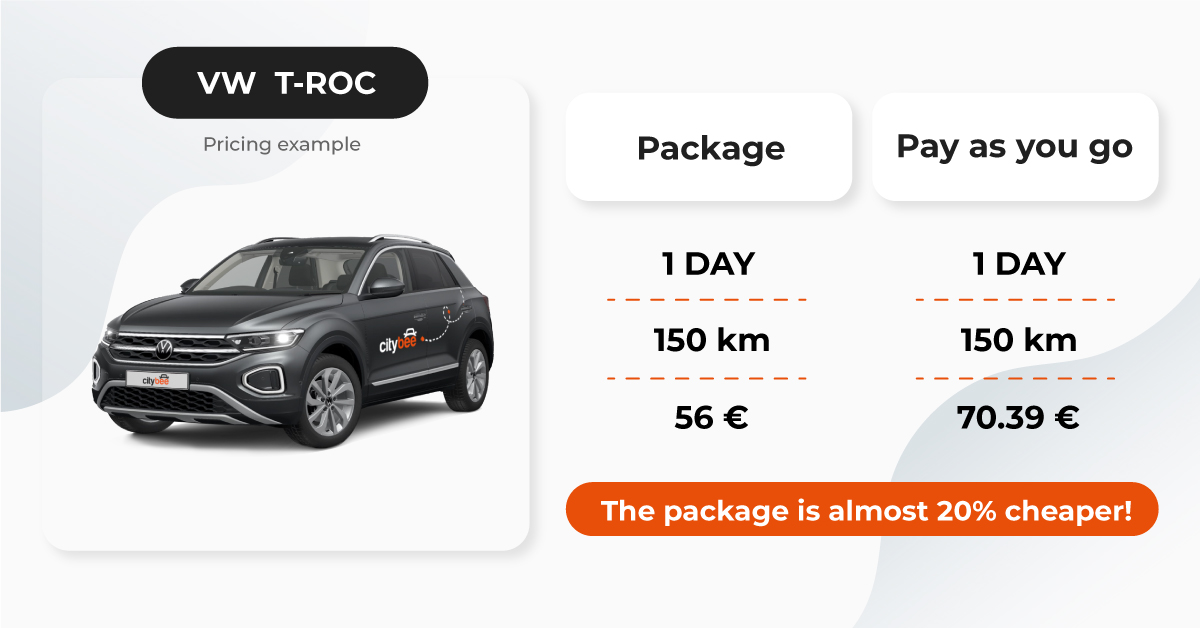
Pay as you go.
Pay for minutes, hours, days and kilometres. See the price of the journey in our Price calculator.
Trip package.
In the app, you can buy before your trip a fixed-price package that includes a certain amount of kilometers and time. The different packages and their prices are listed below.
7.49€
8.99€
9.49€
9.49€
9.99€
10.49€
10.99€
11.49€
11.99€
11.99€
12.49€
13.99€
13.99€
16.99€
17.99€
18.49€
18.99€
19.99€
20.99€
21.99€
22.99€
22.99€
23.99€
26.99€
19.99€
24.99€
26.99€
26.99€
27.99€
28.99€
30.99€
31.99€
33.99€
33.99€
34.99€
39.99€
31€
35€
40€
36€
42€
40€
42€
43€
48€
48€
50€
55€
49€
55€
61€
56€
65€
60€
62€
64€
71€
72€
76€
82€
64€
72€
81€
75€
87€
80€
83€
84€
93€
94€
99€
107€
85€
94€
105€
97€
113€
100€
105€
105€
120€
120€
125€
135€
60€
67€
74€
69€
79€
75€
78€
81€
90€
90€
94€
104€
85€
94€
104€
97€
112€
105€
109€
113€
126€
126€
132€
145€
108€
120€
133€
124€
143€
135€
140€
145€
162€
162€
170€
186€
96€
106€
117€
110€
126€
120€
125€
129€
144€
144€
151€
166€
116€
129€
142€
133€
153€
145€
151€
156€
174€
174€
183€
200€
148€
164€
181€
170€
195€
185€
192€
199€
222€
222€
233€
256€
222€
248€
250€
251€
269€
255€
265€
275€
307€
305€
321€
352€
283€
316€
318€
320€
343€
325€
338€
350€
391€
389€
409€
449€
401€
447€
452€
454€
486€
460€
478€
495€
553€
551€
579€
635€
479€
535€
539€
542€
580€
550€
571€
592€
661€
659€
693€
760€
706€
788€
796€
800€
857€
811€
842€
874€
975€
971€
1021€
1120€
871€
972€
995€
986€
1071€
1000€
1039€
1077€
1202€
1198€
1259€
1381€
11.49€
22.49€
32.99€
50€
85€
118€
260€
520€
800€
7.49€
8.99€
9.49€
9.49€
9.99€
10.49€
10.99€
11.49€
11.99€
11.99€
12.49€
13.99€
13.99€
16.99€
17.99€
18.49€
18.99€
19.99€
20.99€
21.99€
22.99€
22.99€
23.99€
26.99€
19.99€
24.99€
26.99€
26.99€
27.99€
28.99€
30.99€
31.99€
33.99€
33.99€
34.99€
39.99€
31€
35€
40€
36€
42€
40€
42€
43€
48€
48€
50€
55€
49€
55€
61€
56€
65€
60€
62€
64€
71€
72€
76€
82€
64€
72€
81€
75€
87€
80€
83€
84€
93€
94€
99€
107€
85€
94€
105€
97€
113€
100€
105€
105€
120€
120€
125€
135€
60€
67€
74€
69€
79€
75€
78€
81€
90€
90€
94€
104€
85€
94€
104€
97€
112€
105€
109€
113€
126€
126€
132€
145€
108€
120€
133€
124€
143€
135€
140€
145€
162€
162€
170€
186€
96€
106€
117€
110€
126€
120€
125€
129€
144€
144€
151€
166€
116€
129€
142€
133€
153€
145€
151€
156€
174€
174€
183€
200€
148€
164€
181€
170€
195€
185€
192€
199€
222€
222€
233€
256€
222€
248€
250€
251€
269€
255€
265€
275€
307€
305€
321€
352€
283€
316€
318€
320€
343€
325€
338€
350€
391€
389€
409€
449€
401€
447€
452€
454€
486€
460€
478€
495€
553€
551€
579€
635€
479€
535€
539€
542€
580€
550€
571€
592€
661€
659€
693€
760€
706€
788€
796€
800€
857€
811€
842€
874€
975€
971€
1021€
1120€
871€
972€
995€
986€
1071€
1000€
1039€
1077€
1202€
1198€
1259€
1381€
11.49€
22.49€
32.99€
50€
85€
118€
260€
520€
800€
Visit the FAQ page and check the answers to the Frequently Asked Questions.